Pay-per-click advertising has become more complex, not less.
Between automation, smart bidding, evolving privacy rules, and constant interface changes inside Google Ads, PPC specialists are expected to move faster while making fewer mistakes.
Browser tools and Chrome extensions have become one of the most effective ways to reduce friction in that process.
They provide real-time insight directly inside the browser, remove repetitive manual work, and surface competitive data that would otherwise require multiple platforms.
This is why the best chrome extensions for PPC specialists are no longer optional productivity add-ons.
They function as lightweight intelligence layers that sit between you and ad platforms, helping you validate decisions before budgets are committed.
Whether you manage Google Ads, Microsoft Ads, or paid social landing pages, the right extensions can shorten research cycles, improve quality scores, and catch issues before performance drops.
A common challenge in PPC work is context switching. Moving between ad platforms, analytics tools, spreadsheets, and third-party research platforms creates delays and increases the chance of oversight.
Chrome extensions reduce this problem by embedding data where decisions happen. From ad previewing to keyword intelligence, these tools are designed to make PPC workflows more precise without increasing cognitive load.
Another reason these tools matter is speed. Competitive auctions move quickly, and delayed reactions often cost money.
Extensions allow PPC specialists to audit ads, inspect landing pages, and assess competitor activity in real time.
Over time, this compounds into better optimization habits and more consistent performance.
Google Ads Transparency Center Helper
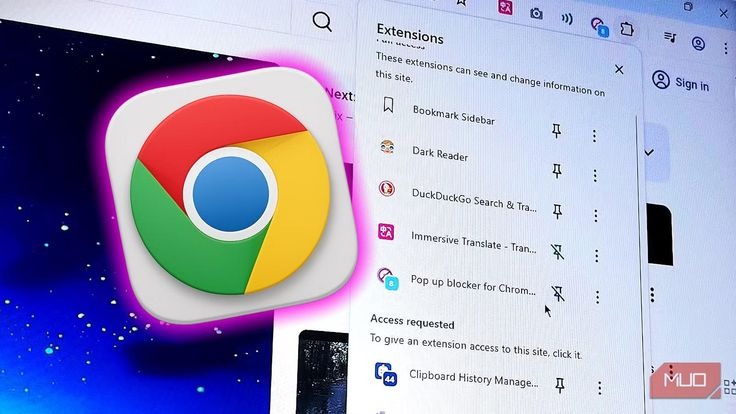
Ad transparency has become a central part of modern PPC research. The Google Ads Transparency Center allows advertisers to view active ads across regions, formats, and advertisers.
The challenge is that navigating this database manually is time-consuming. Chrome extensions built to support transparency research reduce this friction by surfacing ad data instantly while browsing.
For PPC specialists running competitive analysis, this tool helps answer a critical operational question: what ads are currently running in this market, and how are they positioned?
By seeing creative formats, messaging patterns, and landing page flows directly in the browser, specialists can assess whether competitors are leaning into price, trust signals, urgency, or feature differentiation.
This extension is particularly useful for validating creative assumptions. Instead of guessing what works in a niche, you can observe live ads and align your messaging strategy accordingly.
It also helps identify seasonal messaging shifts, compliance language, and brand positioning changes that might not show up in keyword tools.
Transparency tools are frequently used during account audits and new campaign planning.
They provide contextual intelligence that complements keyword data and historical performance metrics.
When used consistently, they reduce guesswork and help PPC specialists align creative strategy with real market behavior.
Google’s official documentation on ad transparency explains how advertisers disclose creative activity and regional availability, which reinforces why visibility tools matter in competitive markets.
Keywords Everywhere
Keyword research remains foundational in PPC, even in an era of automation and broad match expansion.
Keywords Everywhere continues to rank among the best chrome extensions for PPC specialists because it delivers keyword intelligence directly inside the browser without forcing a context switch.
The extension overlays search volume, cost-per-click estimates, and competition metrics across Google Search, YouTube, and competitor sites.
This is especially valuable when validating whether a keyword theme has commercial intent worth bidding on.
Rather than relying on isolated keyword planner data, PPC specialists can assess intent signals while reviewing SERPs, blog content, and landing pages.
One overlooked benefit of this tool is its role in negative keyword discovery. When scanning SERPs or content clusters, irrelevant or low-intent phrases become obvious.
Catching these early helps prevent wasted spend and improves overall campaign efficiency.
The tool also supports long-tail expansion, which remains relevant for account structure, especially in industries with high CPCs.
Even as automation increases, strong keyword foundations still improve signal quality and bidding outcomes.
Keywords Everywhere integrates well with broader Google Ads workflows and aligns with how PPC specialists naturally research markets.
Its persistent popularity reflects how effective simple, embedded data can be when decisions need to be made quickly.
Learn more about keyword intent and CPC modeling from Google Ads’ official keyword planning resources.
Tag Assistant Legacy (by Google)
Tracking integrity underpins every PPC decision. Without accurate conversion tracking, even the best bidding strategies fail.
Tag Assistant remains one of the best chrome extensions for PPC specialists focused on data accuracy and attribution validation.
This tool allows advertisers to verify Google Ads tags, Google Analytics tags, and conversion pixels directly on live pages.
Instead of guessing whether a conversion action fired correctly, PPC specialists can confirm tag behavior in real time.
The value here is operational clarity. When performance drops, tracking issues are often the hidden culprit.
Tag Assistant helps identify duplicate tags, missing parameters, or broken triggers before they distort performance data.
This is especially critical when implementing enhanced conversions, consent mode, or server-side tracking configurations.
For agencies and consultants, the extension is frequently used during onboarding audits.
It provides fast insight into whether an account’s data infrastructure is reliable enough to support automated bidding strategies.
Google’s own documentation emphasizes the importance of accurate tagging for optimization and reporting, reinforcing why this tool remains essential.
Meta Pixel Helper
While this article focuses primarily on PPC, most specialists manage campaigns across multiple platforms.
The Meta Pixel Helper earns its place among the best chrome extensions for PPC specialists because cross-platform ad consistency matters.
The extension verifies Meta pixel implementation, event firing, and parameter accuracy on landing pages.
This is critical for advertisers running Google Ads traffic into funnels that also rely on Meta retargeting or attribution modeling.
By identifying missing events, duplicate fires, or mismatched parameters, the tool helps maintain clean data across platforms.
This prevents attribution conflicts and improves audience quality for remarketing campaigns.
For PPC specialists working in full-funnel environments, this tool supports better coordination between paid search and paid social strategies.
It also helps ensure landing page changes don’t silently break tracking.
Meta’s developer documentation highlights best practices for pixel setup and event tracking, which aligns closely with how this extension is used in practice.
Wappalyzer
Understanding the technology stack behind competitor landing pages offers subtle but valuable insights.
Wappalyzer detects frameworks, analytics tools, CMS platforms, and marketing technologies used on any website.
For PPC specialists, this information helps evaluate landing page sophistication. If high-performing competitors consistently use specific optimization tools, CRO platforms, or analytics stacks, it may indicate performance advantages worth investigating.
The extension also supports internal diagnostics. When auditing your own pages,
Wappalyzer confirms whether tracking tools, A/B testing software, or analytics platforms are properly deployed.
While it doesn’t directly influence bidding or keywords, it informs strategic decisions around landing page performance, experimentation, and scalability.
This contextual awareness is why it remains relevant in PPC workflows.
More on marketing technology stacks and analytics integration can be found through industry research on digital analytics tooling.
Lighthouse
Landing page performance directly impacts quality score, conversion rate, and cost per click. Lighthouse provides performance, accessibility, and best-practice audits directly within Chrome.
For PPC specialists, the extension is often used to validate whether slow load times or technical issues are undermining paid traffic performance.
Instead of relying on assumptions, Lighthouse produces concrete metrics that guide optimization priorities.
This tool is particularly useful during pre-launch checks and post-migration audits. Small performance improvements can significantly reduce bounce rates, especially for mobile traffic.
Google’s Web Vitals documentation reinforces how page speed and user experience influence advertising outcomes.
Google Analytics Debugger
Accurate analytics is non-negotiable for PPC decision-making. Google Analytics Debugger exposes how data is being sent to GA in real time, helping identify discrepancies that don’t show up in standard reports.
PPC specialists often rely on this tool when conversions don’t align between Google Ads and Analytics. It helps trace event parameters, session data, and attribution signals.
This extension is especially valuable during GA4 migrations and advanced event configuration. By validating tracking at the browser level, it reduces reliance on delayed reporting.
Ad Preview and Diagnosis Tool Shortcut
Ad previewing without triggering impressions is a subtle but important discipline. This Chrome shortcut integrates Google’s Ad Preview and Diagnosis Tool directly into browsing workflows.
PPC specialists use it to check ad visibility across locations, devices, and audiences without contaminating performance data. This preserves impression integrity and prevents skewed CTR metrics.
The tool also supports troubleshooting approval issues, impression gaps, and auction visibility challenges.
Keyword Surfer
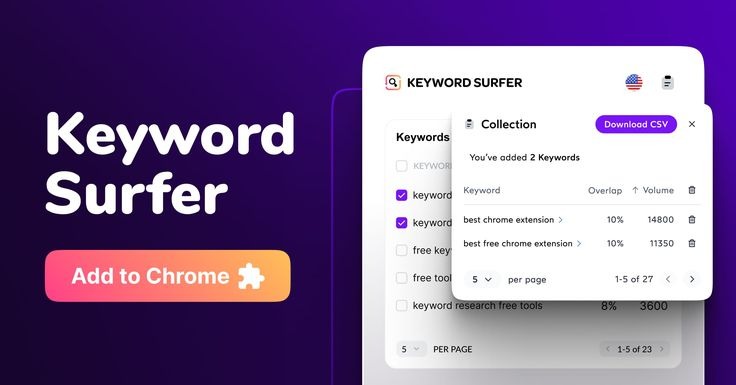
Keyword Surfer has quietly become one of the most practical tools inside the best chrome extensions for PPC specialists category, largely because it prioritizes intent validation over raw keyword lists.
Instead of forcing PPC specialists into a separate keyword research environment, it overlays search volume, estimated CPC, and keyword similarity data directly into Google search results.
This matters because modern PPC research rarely starts inside Google Ads anymore. It starts in the SERP.
PPC specialists need to understand how commercial a query really is before assigning budget, especially as broad match and smart bidding rely heavily on intent signals rather than exact keyword control.
Keyword Surfer helps confirm whether a term attracts advertisers, informational content, or mixed intent — a distinction that directly affects bidding strategy and expected conversion rates.
Another reason the tool remains popular is speed. When evaluating new niches, landing page ideas, or client industries, PPC specialists can validate demand without interrupting their workflow.
This reduces reliance on rough estimates or assumptions pulled from outdated keyword lists.
The extension is also useful for identifying supporting keyword themes that can later inform ad group structuring or Performance Max asset creation.
While it does not replace Google’s Keyword Planner, it complements it by providing immediate, contextual insights that help guide smarter decisions earlier in the planning process.
Keyword Surfer’s approach aligns well with how PPC specialists work today: fast validation, minimal friction, and direct relevance to search behavior.
WhatRuns
Competitive intelligence extends beyond ad copy and keywords. Understanding the technology behind high-performing landing pages often reveals why certain campaigns convert better than others.
WhatRuns earns its place among the best chrome extensions for PPC specialists because it exposes the marketing and advertising tools powering competitor websites in real time.
With a single click, PPC specialists can identify landing page builders, analytics platforms, conversion rate optimization tools, chat widgets, and tracking scripts.
This information helps explain performance differences that aren’t obvious from ads alone.
For example, a competitor running similar offers may outperform simply because their landing pages are optimized using advanced testing tools or faster frameworks.
WhatRuns is particularly useful during campaign audits and market research phases.
When launching in a new vertical, seeing consistent patterns in competitor tech stacks helps PPC specialists anticipate required infrastructure investments.
It also informs discussions with clients who may underestimate the importance of landing page optimization.
Internally, the tool is often used to validate whether tracking systems are firing correctly after site changes or migrations.
By confirming what tools are present, PPC specialists reduce uncertainty when diagnosing performance drops.
While WhatRuns does not directly influence bidding or targeting, it supports stronger decision-making around conversion optimization — a core lever in paid acquisition success.
Facebook Ad Library & Ad Library Helper Extensions
Creative intelligence is no longer optional in PPC. Platforms increasingly reward relevance, engagement, and message clarity, making competitor ad analysis a critical part of campaign planning.
Facebook Ad Library tools and helper extensions are widely recognized among PPC specialists because they simplify access to active ads across industries and regions.
These tools allow PPC specialists to view live creatives, offers, disclaimers, and messaging structures without relying on guesswork.
This is especially valuable when launching campaigns in regulated industries, where compliance language and transparency standards can affect approvals and performance.
By observing how competitors structure hooks, CTAs, and value propositions, PPC specialists can align messaging strategies with proven market patterns.
This does not mean copying ads directly, but rather understanding what themes dominate a niche and where differentiation opportunities exist.
Ad library tools are also useful for monitoring creative fatigue.
When competitors rotate creatives frequently, it often signals aggressive testing or performance volatility.
Conversely, long-running ads can indicate stable offers worth analyzing further.
Copy Extraction & Inspection Tools (CopyFish / Selector-Based Extensions)
Ad copy and landing page messaging analysis is a routine task for PPC specialists, particularly during audits, competitor research, and creative planning.
Copy extraction tools such as CopyFish or selector-based extensions streamline this process by allowing fast access to structured text on otherwise restrictive pages.
These tools are commonly used to document competitor value propositions, pricing language, trust signals, and compliance disclaimers.
Instead of manually recreating layouts or screenshots, PPC specialists can extract text cleanly and evaluate messaging frameworks objectively.
This becomes especially useful when rebuilding or testing new landing pages.
By analyzing how competitors organize headlines, subheadings, and CTAs, PPC specialists gain insight into common persuasion patterns within a niche.
This supports better creative collaboration with designers and copywriters.
Internally, these tools also help with QA. After landing page updates, PPC specialists can quickly confirm that required copy elements are present and correctly implemented across devices.
While simple in function, copy extraction tools save time and reduce friction in workflows that would otherwise be repetitive and error-prone.
Their continued use reflects practical necessity rather than novelty.
Why These Tools Matter Together
Individually, each extension solves a narrow problem.
Collectively, they form a lightweight operational stack that supports faster decisions, cleaner data, and more consistent performance across paid media workflows.
This is where the best chrome extensions for PPC specialists deliver their real value. They are not designed to replace ad platforms, analytics suites, or campaign management tools.
Instead, they remove friction from the moments where decisions actually happen.
By embedding intelligence directly into the browser, these tools reduce unnecessary context switching between dashboards, spreadsheets, and third-party platforms.
PPC specialists can validate intent in the SERP, confirm tracking accuracy on live pages, inspect competitor ads, and assess landing page performance without interrupting their workflow.
This creates tighter feedback loops and fewer blind spots.
More importantly, these extensions support how modern PPC work is executed in practice. Campaigns move quickly, data signals change constantly, and mistakes compound fast.
Tools that surface relevant information at the point of action help PPC specialists stay precise, adaptive, and efficient under pressure.
Final Thoughts
The role of a PPC specialist continues to evolve, but fundamentals remain unchanged: data accuracy, intent understanding, competitive awareness, and landing page performance still determine outcomes.
Chrome extensions support these fundamentals without adding unnecessary complexity.
Choosing the best chrome extensions for PPC specialists is not about quantity but relevance.
When selected thoughtfully, these tools become silent performance multipliers, improving workflows without demanding attention.
In an environment where small inefficiencies compound into large losses, the right browser tools make a measurable difference.